
See the live site at tourify.city. Because this site is hosted on a free platform (Heroku), the data may take a few seconds to load or require a page refresh.
The final assignment at The Iron Yard was a group project that brought together everything we’d learned over the previous twelve weeks – front and back end integration, responsive design, agile work process, and of course teamwork and collaboration.
My project pitch was Tourify, a travel app for interactive tour experiences. Having worked at the Durham Convention & Visitors Bureau (DCVB), I knew they had an existing print tour that would be more dynamic in a digital format. With DCVB’s permission to use the content and about three weeks to make it happen, our team jumped right in.
I served as the project lead as well as a front end designer and developer. Checkout out the live site at tourify.city and read about the design and development process below.


PLANNING
The first several days were devoted to planning – fleshing out our user stories, sketching wireframes, and discussing the key functionality and data that would power the app.
We identified two main users:
- The traveler who would interact with the front end tour content while out and about in the city.
- The content creator, such as the DCVB, who would create, upload, and maintain the content from a backend interface.

Next we took the tour ourselves, using the existing print guide to evaluate the current experience. The content was interesting but there were a few issues. It was hard to tell if you were at the right location and a lot of information was left off due to the compact nature of the piece. We decided that the addition of photography and travel tips would create a better experience.

Pulling together our user stories and on-the-ground research, we identified the key features for the app:
Front End:
- Easy-to-use interface designed for mobile, but responsive on any device/screen
- Single page React app that uses components and dynamic URLs to change content as user interacts with the app
- Ability to show stop locations and detect user’s current location via Google Maps API
- Ability to start tour at first stop or select a starting point based on current location
- Built so that additional tour content can be added and easily integrated
Back End:
- Database to store data and serve it to the front end via fetch API call
- Interface for content creator to add new tours or edit existing tours
- Ability to add/delete/edit tour and stop info
- Ability for content creators to make account to save and store tour content
INTERFACE DESIGN & BRANDING
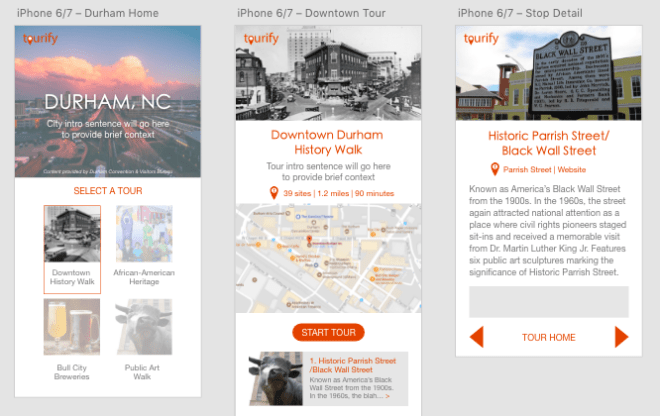
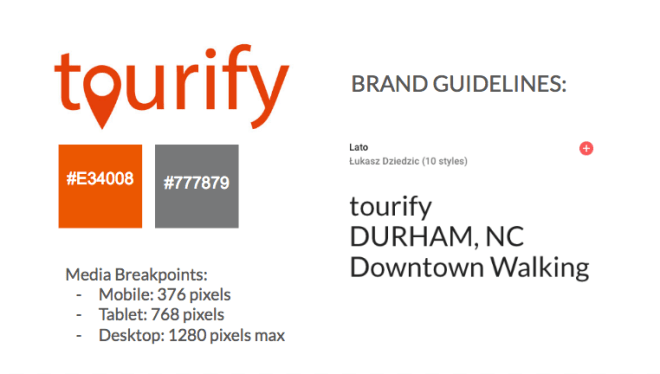
As part of the front end team and someone who enjoys the design process, I used Adobe XD to transform the wireframes into mock-ups. I knew it would make the coding and styling process easier if we were all working from shared styles and brand guidelines.
I created the Tourify logo in Illustrator, identified brand colors and fonts, and shared these elements with the team for feedback.
DEVELOPMENT
Our front end and back end teams split up to code our respective parts of the project, but worked closely together throughout the process. On front end, I built the route and component for the tour home page, created the dynamic routes, and set up the initial fetch to pull in the API data. I also did a majority of the CSS for the front and back end.
Initially we built the app as a combined Rails-React app but about a week in continued to have trouble getting both front end and back end routes to work. After talking to a prior Iron Yard grad, we decided to abandon this approach and split out into separate React and Rails apps. From that point on we were able to move faster, particularly on front end.
Once we got the main features built – including the main parts of the front end traveler interface and the working database – we were able to focus on additional features including the Google maps integration and creating the admin interface.
DEPLOYMENT & DEMO DAY
Both the front and back end sites are deployed on Heroku:
- Front end: https://serene-brushlands-14696.herokuapp.com/
- Back end: https://evening-retreat-85270.herokuapp.com/
The final days of the project overlapped with a tech conference, so much of our communication became virtual. We had a few last minute conflicts, but nothing that couldn’t be fixed with the help of version control in Git/Github. We had an ambitious team and a lot of ideas, so it was hard to reach a stopping point until demo day was upon us.
Our team got to present last at Demo Day and bring it home for the final Iron Yard presentation. We got a lot of great feedback and have some things to think about in terms of the future of the project. If we continue, we’d like to add additional functionality for the traveler such as the ability to save stops or check in and earn badges or discounts.
It was very rewarding to go from idea to working app over just under three weeks. With the help of a great team we presented a great product that we are truly proud of.

A few previews of the back end admin interface:




 Here's The Dill